


Description
Product Overview
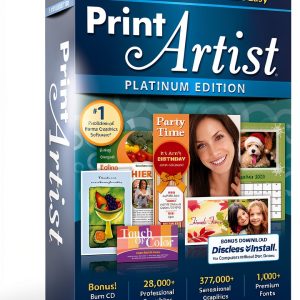
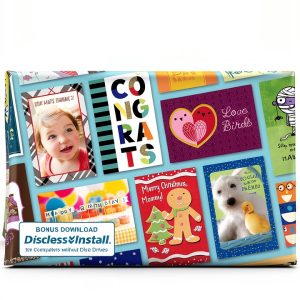
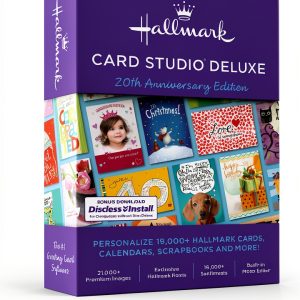
Nova’s greeting card software is a comprehensive digital publishing solution designed for hobbyists, families, and small businesses who want to create high‑quality printed and electronic greeting cards, calendars, and photo projects without the need for professional design skills. The program offers a clean, intuitive interface that guides users through a three‑step workflow: selecting a template, customizing the design with photos and text, and exporting the finished product for print or digital sharing. Built on a robust Windows platform, the software runs smoothly on most modern PCs and laptops, requiring only a modest amount of memory and storage, which makes it accessible to a wide range of users.
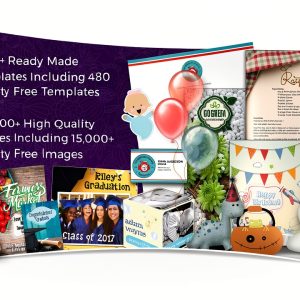
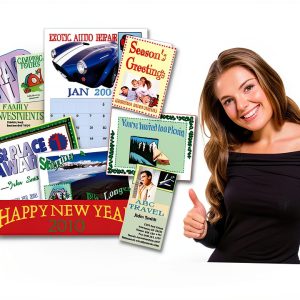
The heart of the application is its massive library of more than twenty‑seven thousand pre‑designed templates, covering every conceivable occasion from birthdays and anniversaries to seasonal holidays, corporate events, and personal milestones. Each template is fully editable, allowing users to replace placeholder images with their own photos, adjust colors, fonts, and layout elements, and add personalized messages that reflect their unique voice. In addition to the template collection, the software includes an advanced built‑in photo editor that provides tools for cropping, resizing, applying filters, and correcting exposure, ensuring that every image looks its best before it is placed into the final design.
To support a seamless creation experience, Nova has integrated a set of smart design assistants that suggest complementary color palettes, recommend font pairings, and automatically align objects for a polished appearance. The program also supports batch processing, enabling users to generate multiple cards or calendar pages from a single source file, which saves time for larger projects such as corporate newsletters or family photo albums. Export options include high‑resolution PDF for professional printing, JPEG for quick sharing on social media, and a printable layout that aligns perfectly with standard paper sizes.
Beyond the core design tools, the application supports a wide range of file formats for both input and output, including JPEG, PNG, BMP for images, and PDF, DOCX, and PPTX for final documents. Users can import their own graphics from cameras, smartphones, or cloud storage services such as Google Drive and Dropbox, making it simple to incorporate the latest photos without leaving the program. The export engine preserves high resolution and color fidelity, which is essential for professional printing services that demand CMYK profiles. Additionally, the software offers customizable print settings, allowing you to select paper type, bleed margins, and duplex printing options directly from the interface.
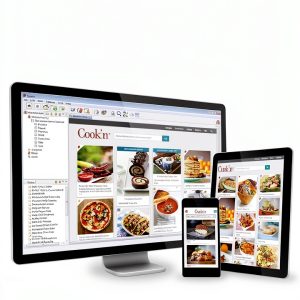
The user interface is organized into clearly labeled panels and toolbars, reducing the learning curve for newcomers while still providing power users with quick access shortcuts. Drag‑and‑drop functionality lets you place images and text blocks with a single mouse movement, and real‑time preview updates show exactly how the final product will appear. Keyboard shortcuts for common actions such as copy, paste, undo, and zoom further accelerate the workflow. The program also includes a library of royalty‑free clip art, decorative borders, and vector shapes that can be resized without loss of quality, giving you endless creative possibilities without additional licensing costs.
![[Product front view showing all components]](https://www.animalstyle.store/wp-content/uploads/2026/06/24e7b50b051041d59b85905b747e5280.jpg)
Usage
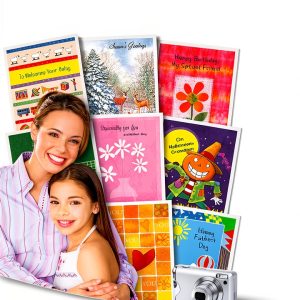
The software is ideal for personal celebrations, allowing families to craft heartfelt birthday cards, wedding invitations, and holiday greetings that incorporate cherished family photographs and custom messages. Parents can involve children in the creative process, turning school artwork or school‑year photos into memorable keepsakes that become treasured family heirlooms. For small business owners, the program provides a cost‑effective way to produce branded greeting cards, promotional calendars, and thank‑you notes that reinforce customer relationships without outsourcing to expensive design agencies.
Educators can use the platform to design classroom newsletters, student award certificates, and event flyers, while community groups can quickly assemble fundraising postcards and event invitations. Because the software runs on standard desktop computers, it can be deployed in shared office environments, libraries, or maker spaces where users can collaborate on projects and print the final products on local printers or take the files to a professional print shop for higher‑volume runs.
Seasonal marketers find the software especially valuable for creating limited‑time promotions, such as holiday discount cards, Black Friday flyers, and New Year greetings that can be emailed to mailing lists or posted on social media. The ability to quickly swap out dates, offers, and images means campaigns can be refreshed weekly without re‑designing from scratch. Non‑profit organizations also benefit by producing donor thank‑you cards and event programs in-house, reducing fundraising expenses and allowing more of the budget to go directly to their cause.
For educators, the platform doubles as a teaching aid for visual literacy, enabling students to experiment with layout, typography, and color theory while working on real‑world projects. Classroom assignments can be saved as project files and shared with peers for collaborative feedback, fostering a community of learning. The software’s compatibility with standard USB drives and network folders ensures that projects can be accessed from any computer in the school, supporting flexible classroom environments and remote learning scenarios.
Why Choose Us
Choosing Nova Development means partnering with a company that has a proven track record in home publishing software, reflected in its strong ranking among best‑selling titles and a dedicated user community that provides feedback and ideas for continuous improvement. The product is backed by regular updates that introduce new templates, seasonal designs, and enhancements to the photo editing engine, ensuring that users always have fresh content to keep their creations relevant and engaging.
Quality and support are core pillars of the Nova brand. Each release undergoes rigorous testing for stability, compatibility, and security, and the company offers responsive customer service through email, live chat, and an extensive online knowledge base that includes video tutorials, step‑by‑step guides, and troubleshooting articles. Users benefit from a hassle‑free licensing model that includes free upgrades for the life of the product, giving them confidence that their investment will remain valuable over time.
Nova’s commitment to data security means that all user projects are stored locally unless you choose to back them up to the cloud, giving you full control over your creative assets. The software does not embed hidden telemetry or unwanted advertisements, which is a common concern with many free design tools. By keeping the application lightweight and ad‑free, Nova delivers a focused experience that respects your privacy and your computer’s performance.
The company’s global support network includes regional partners who can provide localized assistance, language translation, and region‑specific template packs. This ensures that users in different markets receive culturally relevant designs and timely help in their native language. Moreover, Nova offers a satisfaction guarantee: if you encounter any functional issues within the first 30 days, the support team will work with you to resolve them or arrange a refund, reinforcing confidence in the purchase.
Key Features
- Access over 27,000 professionally designed templates covering every occasion, so you can start a project instantly without spending time on layout creation
- Advanced built‑in photo editor lets you enhance images, apply filters, and adjust colors directly within the program, eliminating the need for separate editing software
- Three‑step guided workflow simplifies design, making it easy for beginners to create polished cards and calendars in minutes, while still offering depth for experienced users
- Batch processing and multi‑page export capabilities allow you to produce entire families of cards or full calendar sets with a single click, saving hours on large projects
- Dedicated customer support and free lifetime updates ensure you receive new templates, feature enhancements, and assistance whenever you need it, protecting your purchase
FAQ
Can I print my cards at home or do I need a professional printer?
The software exports high‑resolution PDF files that work perfectly with standard home printers, and you can also choose JPEG for quick sharing. If you prefer a professional finish, the same files can be sent to any commercial print shop.
What operating systems are supported?
Nova greeting card software runs on Windows 10 and later versions, supporting both 64‑bit and 32‑bit installations. The program requires a minimum of 2 GB RAM and 500 MB of free disk space, making it suitable for most modern PCs.
Is there a trial version available?
Yes, a fully functional 30‑day trial can be downloaded from the Nova website, allowing you to explore the entire template library, use the photo editor, and create projects before deciding to purchase the full license.
How do I receive updates and new templates?
Updates are delivered automatically through the built‑in update manager. Once connected to the internet, the software checks for the latest version and downloads any new templates or feature improvements, ensuring you always have the freshest content.






















































Reviews
There are no reviews yet.